![VN Logo-1.png]](https://partner.venuenow.com/hs-fs/hubfs/VN%20Logo-1.png?height=25&name=VN%20Logo-1.png)
TL;DR
Your enquiry dashboard now has a Last Engagement column showing whether your reply was delivered, opened, and replied to. The status tag on the left also shows your initial response time at a glance. Use these signals to spot bounced emails, follow up on unopened replies, and respond faster to win more bookings. Engagement tracking starts from 4 June 2026.
Overview
Until now, once you replied to an enquiry you couldn't tell whether your response actually reached the client, whether they read it, or whether they were waiting on you. The new engagement insights close that gap.
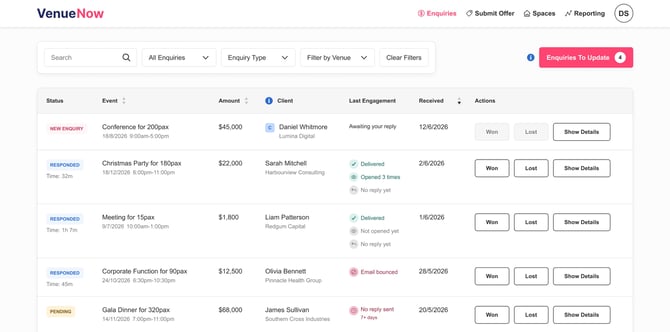
There are two new things to look for on the Enquiries dashboard:
1. The Last Engagement column shows what's happening with your reply, including:
- Deliverability - whether your reply was delivered, or whether it bounced.
- Opens - whether the client has opened your email, and how many times.
- Reply status - whether the client has replied yet.
The Last Engagement column always reflects the most recent email you sent to the client. If you've exchanged ten emails back and forth, the insights shown are for the latest one you sent - not the whole conversation. So as your exchange progresses, the delivery, open, and reply signals update to track your most recent message.
2. Response time under the status tag. Under the status label on the left, you can now see how fast your initial response was at a glance.
Last engagement states:
- New Enquiry → Awaiting your reply - a new enquiry that needs a response.
- Responded → shows your response time, plus the delivery status, open count, and client reply status.
- Pending → You haven't replied in 7+ days - an enquiry that's slipped through the cracks and needs attention.
Together, these signals tell you exactly where each enquiry stands, so you can prioritise the ones most likely to convert and chase the ones going cold.
Important notes
Engagement tracking starts 4 June 2026. Enquiries received before this date may not contain engagement data, unless your conversation with the client is still ongoing.
Bounced & Undelivered emails. A reply usually bounces or doesn't deliver due to one of three reasons:
-
The file size of your attachments are too large. The system we use to deliver emails has a limit where the combined file size of attachments cannot exceed 30MB. In this case, ensure any PDF attachments and images are compressed before sending to the client and the combined file size of your attachments is less than 30MB (the smaller the better). If you cannot compress your attachments below a combined 30MB, we recommend using a file sharing system (eg. Google Drive, OneDrive, Dropbox) where you can send a link to the file in your email.
-
The client's email system or server has blocked your response. Some companies and government organisations have strict email filters to block external emails from reaching an employee's inbox. In this case, give the client a call to see if they received the email, and if not - ask if they can whitelist VenueNow's email domains (venuenow.com and enquiry.venuenow.com). Alternately, ask the client if there is a different email address you can send your response to.
-
The client has a typo in their email address. We do our best to ensure emails are verified with our real-time email verification feature, however, sometimes typos slip through the cracks. In this case, give the client a call to verify their email address and resend your response to their verified email address.
If you've tried the methods above and are still having issues with bounced or undelivered emails, contact us at partner@venuenow.com and we'll investigate and help troubleshoot.
Open tracking isn't always exact. Depending on the email system or device the client uses, opens may not always be tracked. Treat opens as a helpful signal, not a guarantee.
Tips
Respond as fast as you can. Top-performing venues keep their average initial response time under 6 hours. Faster replies lead to a higher response rate from clients, and ultimately a higher booking conversion rate. In your initial response, make sure you include:
- Whether your space is available - and if not, any alternate dates, times, or spaces you can offer.
- A rough idea of what it will cost the client.
- Any offers or packages that could help get the booking over the line.
Follow up if you don't hear back. If a client hasn't replied to your response, follow up via email - and we recommend calling them as well. A quick call often makes the difference between a cold enquiry and a confirmed booking.