![VN Logo-1.png]](https://partner.venuenow.com/hs-fs/hubfs/VN%20Logo-1.png?height=25&name=VN%20Logo-1.png)
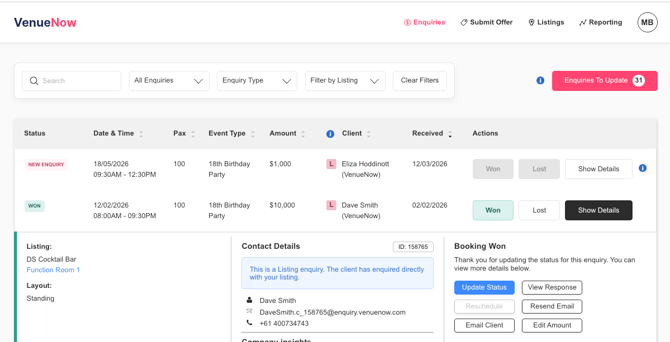
Manage your enquiry and booking statuses from your VenueNow dashboard.
When you reply to an enquiry, its status will automatically update to “Responded”.
An enquiry may be marked as “Lost” if another venue has secured the booking. You can also manually set any enquiry to “Won” or “Lost” directly in the dashboard.
If a booking is marked as “Won”, update the minimum or estimated spend so your records stay accurate. If a booking is marked as “Lost”, record the reason. Over time, these insights help you understand performance and identify opportunities to improve.
You can adjust an enquiry’s status at any time. For example, if a booking was initially “Lost” but later converts, simply change the status to “Won” so your dashboard reflects the actual outcome.
Enquiries marked as “Pending” have either not been responded to (according to our system) or have not yet been marked as “Won” or “Lost”. Be sure to reply via email directly from the enquiry so our system can automatically detect your response and update the status on your dashboard.
Some key details you'll be able to see on your enquiry dashboard include:
- Date and Time
- Number of Attendees
- Activity Type
- Space Receiving the Enquiry or Booking
- Budget Amount
- Date Enquiry or Booking is Received
- Status