![VN Logo-1.png]](https://partner.venuenow.com/hs-fs/hubfs/VN%20Logo-1.png?height=25&name=VN%20Logo-1.png)
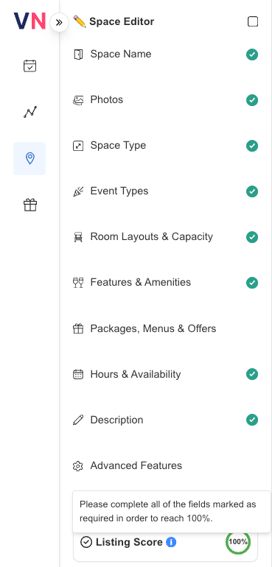
What is the Space Score?
The Space Score is the percentage ring shown in the “Completed” column for each space in your profile. It measures how complete and informative your space listing is.
To improve your Space Score, edit your space and fill in all required fields. Aim for 100% completion; however, a score above 75% is considered a “pass.”
Why is the space score important?
- Spaces with a higher space score appear higher in the search results
- This means that you'll receive more views on your space page.
- You'll receive more enquiries and bookings
-
- Capacity and Space Details
Choose the types of events your space can host, add capacity and layout information, and create an inviting title for your space to attract potential customers. - Amenities & Extras
Select the amenities available in your space—marked in red if free or blue for an additional cost. - Menus & Packages
Upload any offers or packages to enhance your listing and attract more bookings. - Since your space has more and higher quality information, customers are able to quickly find and compare the features in your space that they're looking for such as:
- Capacity and Space Details
-
-
-
- High quality photos
Enhance your space listing with clear, high-resolution photos. Use landscape orientation, aim for a minimum 1200px wide, capture various angles, and include images of common areas like the foyer or breakout spaces. High-quality photos make your space more appealing to potential customers. - Rich descriptions
Create an engaging, concise description that highlights the key features of your space. Include details like capacity, natural lighting, and privacy; proximity to major attractions or transport; available amenities like TVs and whiteboards; and any extras like catering. Keep it short—guests are looking for quick insights to compare options easily.
Spaces that include all of this information tend to have higher conversion rates from page views to inquiries and bookings.
- High quality photos
-
What do the colours represent?
- Green means your score is greater than or equal to 75%
- 75% represents a "pass" and the additional factors that add up to 100% will help you appear higher in search results and convert more enquiries and bookings
- Yellow means your score is between 50 and 75%
- Your space is close to passing but there is still some more information to add
- Red means your score is less than 50%
- Your space is missing some vital information to publish your space
Space Score Breakdown
Here’s an overview of the criteria that make up the Space Score. Each completed item adds points to your score, with a total of 100 possible points. Meeting these requirements can help boost your space’s visibility and appeal to potential customers.
|
Factor |
Score |
|
Number of photos uploaded >=5 |
20 |
|
At least 1 function pack, menu or offer added |
20 |
|
Number of event types selected >= 5 |
10 |
|
Length of space description >= 200 characters |
10 |
|
At least 1 space type selected |
5 |
|
At least 1 layout selected |
5 |
|
Space Name >=20 characters |
5 |
|
Number of amenities selected >=3 |
5 |
|
Show Pricing = True |
5 |
|
Total |
100 |